Sound Level Meter
Overview
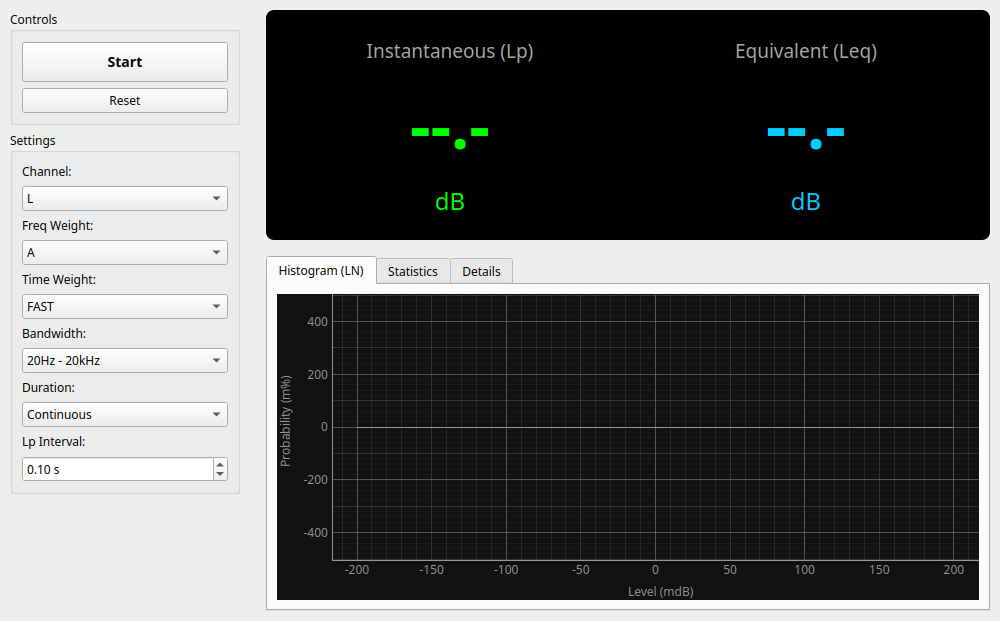
The Sound Level Meter measures environmental noise and the sound pressure level (SPL) of audio equipment, with A/C/Z frequency weighting and selectable time responses. These functions alone do not establish IEC 61672 compliance for the complete measurement system.
Basic Operation
Starting Measurement
- Start Button: Begins the measurement.
- Reset Button: Clears all readings, statistics, histogram data, and filter memory. During acquisition, it starts a fresh interval and restarts the selected duration. While stopped, it clears the retained result without starting acquisition.
- Changing the channel, frequency/time weighting, bandwidth, or duration starts a fresh interval. Results from different settings are never combined.
- The status line shows acquired audio time and the time covered by LN statistics. Completed results remain available in every tab until reset or a new acquisition.
Main Display
The large numbers displayed at the top of the screen.
- Instantaneous (Lp): The current instantaneous sound pressure level.
- Equivalent (Leq): Equivalent continuous sound level. Shows the "average" energy level from the start of measurement to the present. Often used for evaluating fluctuating noise.
Detail Tabs
- Histogram (LN): Displays the distribution of sound pressure levels in a bar graph.
- Statistics: Displays statistical indicators.
- L10 / L90: Levels exceeded for 10% and 90% of the sampled time, respectively.
- L50: Median value (level exceeded 50% of the time).
- L5 / L95: Represent levels close to the noise peaks and background noise (ambient noise), respectively.
- Details: Displays detailed data such as Lmax (maximum value), Lmin (minimum value), Lpeak (peak value of the waveform), and LE (sound exposure level for single events).
Settings
Channel
Select the input channel (L or R) to be used for measurement.
Freq Weight (Frequency Weighting)
Select filters to match human hearing characteristics.
- A-Weighting: Characteristics close to the sensitivity of the human ear. Most commonly used for general noise measurement (environmental sounds, noise regulation, etc.).
- C-Weighting: Characteristics that do not cut low frequencies as much as A-weighting. Used for measuring loud sounds or mechanical noise.
- Z-Weighting: No correction (flat) characteristics. Used for measuring physical sound pressure itself.
Time Weight (Time Weighting)
Select the follow-up speed for level fluctuations.
- FAST (125ms): For general-purpose measurement. Captures fluctuating sounds.
- SLOW (1s): Suitable for observing the average level of slow fluctuations.
- IMPULSE: A special mode for measuring impact sounds (hitting sounds, etc.) (very fast rise, slow decay).
- 10ms: Unique setting for capturing extremely fast fluctuations.
Bandwidth
Limits the frequency bandwidth to be measured.
- 20Hz - 20kHz (Wide): Entire audible range.
- 20Hz - 12.5kHz / 8kHz: Used when matching specific sound level meter standards, etc.
Duration
Sets the acquired audio duration (e.g., 1 minute or 10 minutes). Acquisition stops at the exact sample boundary, even within a callback block. This counts delivered audio samples rather than elapsed computer-clock time; an interruption does not count as recorded silence. "Continuous" acquires until manually stopped. A sample-rate change clears the interval and filter state before acquiring at the new rate.
LN Statistics Window
Lp is sampled at fixed 100 ms audio-sample boundaries (4,410 samples at 44.1 kHz; 4,800 at 48 kHz), including every boundary within a large callback. This interval is fixed, not an adjustable control.
LN percentiles and the histogram cover up to the latest 10 hours. The window rolls forward after reaching that limit; Leq, LE, Lmax, Lmin, and Lpeak continue to cover the full acquisition. LN values are unavailable until the first 100 ms boundary. Lave is the energy average of the retained Lp samples; it is distinct from Leq, which integrates every frequency-weighted input sample.
IMPULSE applies an asymmetric exponential detector to every squared sample, with a 35 ms rise and 1.5 s fall. Its state carries across callbacks. This replaces the previous eight-sample peak-pooling approximation, so IMPULSE readings can differ from older versions. It is not a claim of standards certification.
About Calibration
To display accurate "dB SPL" values, please calibrate the "SPL Offset" in the "Calibration" tab of the Settings widget beforehand. If not calibrated, a warning message is displayed and the unit automatically falls back to digital full scale (dBFS).
Calibration offsets apply consistently to the retained readings, LN values, and histogram axis, including while stopped. Changing the offset re-expresses the same digital measurement; it does not restart acquisition.