1PPS Monitor
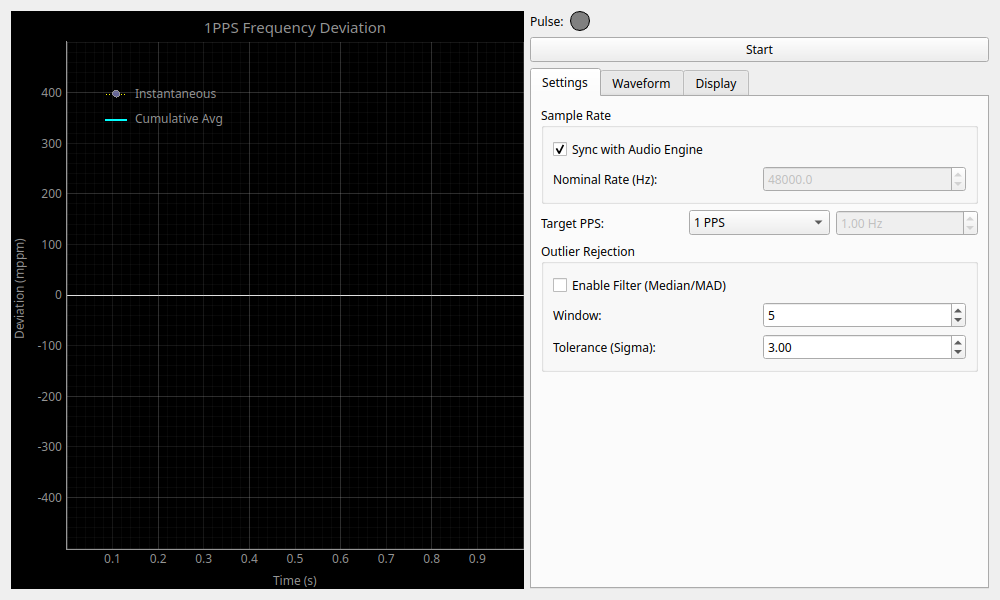
Overview
An experimental tool for monitoring 1PPS (Pulse Per Second) signals and precisely measuring the stability and clock deviation of sampling rates.
It inputs a pulse signal output every second from a GPS receiver or high-precision clock source, and analyzes/displays the deviation (PPM: Parts Per Million) from the audio interface's sample rate in real-time.
- 1PPS: A pulse signal output exactly once per second, typically from a high-precision clock source such as GPS.
- PPM (Parts Per Million): A unit representing one millionth. A deviation of 10 PPM is equivalent to a 10-second difference over 1 million seconds (about 11.5 days).
Features
- Sample PPM Deviation Measurement: Measures the number of samples between the rising edges of pulses and displays the deviation by comparing it with the nominal rate.
- Arbitrary Frequency Support (Target PPS): Can set not only 1PPS but also 10PPS or pulse signals of arbitrary frequencies as the measurement target.
- Trigger Waveform Display: Visualizes the waveform before and after the detected pulse, allowing visual confirmation of the trigger state.
- PPM Display: Graphs the deviation of the instantaneous value and cumulative average in PPM units.
- Outlier Filter: Equipped with a robust filter using Median Absolute Deviation (MAD) to prevent false detections caused by noise or glitches.
- Input Latency Compensation: Enables precise measurement considering the input latency of the audio interface and manual offsets.
- Statistics: Displays statistical information such as detection count, average deviation, standard deviation, and maximum/minimum deviation.
Operation
Starting and Stopping Measurements
- Start / Stop Button: Starts or stops the measurement.
- Sync with Audio Engine: When checked, automatically sets the current sampling rate of the audio engine as the nominal rate.
Tab Layout
The control panel is divided into multiple tabs.
Settings
- Sample Rate: Sets the reference sampling rate.
- Target PPS (Hz): Sets the frequency of the pulse signal to be measured (default is 1.0Hz). This allows support for signals like 10PPS.
- Outlier Rejection: Filter settings to remove sudden measurement errors or noise.
- Enable Filter: Enables the filter.
- Window: The number of recent samples (window size) used for filter calculation.
- Tolerance (Sigma): The tolerance range for considering a value an outlier based on its distance from the median.
Waveform
Allows real-time confirmation of the detected pulse waveform and adjustment of trigger settings.
- Input Waveform (Triggered): Displays the waveform before and after (default ±0.5 seconds) the moment the trigger (pulse detection) occurs.
- Threshold (FS): The signal level threshold considered as a pulse. Indicated by a green line on the waveform graph.
- Hysteresis (FS): Hysteresis to prevent chattering. Indicated by a red dotted line on the waveform graph.
- Latency Compensation: Sets delay compensation for measured values.
- Compensate Input Latency: Automatically subtracts the input latency reported by the audio interface.
- Manual Offset (ms): Manually sets additional delay compensation (in milliseconds).
Display & Statistics
- Unit: Switches the graph unit between
PPMandSeconds. - Show Instantaneous: Toggles the display of instantaneous values.
- Calibration: Calculates and saves the calibration coefficient from the measured values.
- Stored 1PPS Cal: The currently saved correction value (ppm).
- Calibrate from Current: Performs calibration based on the current cumulative average value and saves it in the "1PPS Frequency Calibration" slot.
To apply this monitor's calibration value to the entire system, switch the Frequency Calibration Source to
1PPS Monitorin the Calibration tab of the Settings widget.
- Statistics:
- Count: The number of pulses detected.
- Inst / Cumul: The latest instantaneous value and cumulative average value (PPM).
- Rate: The effective sampling rate estimated from the measurement.
- Mean / Std Dev: The average value and standard deviation of the deviation.
- Min / Max: The minimum and maximum deviation since the start of measurement.
Reading the Graph
- Instantaneous (Dotted Line, Yellow): Displays the instantaneous deviation for each pulse. Suitable for checking jitter and short-term fluctuations.
- Cumulative Avg (Solid Line, Cyan): Displays the cumulative average deviation since the start of measurement. Suitable for checking long-term clock drift (frequency offset).
Executing "Calibrate from Current" saves the calculated correction coefficient in the settings. While this value is used for the audio engine's frequency settings, it does not reset the graph display of the monitor itself.