Event Detector
Overview
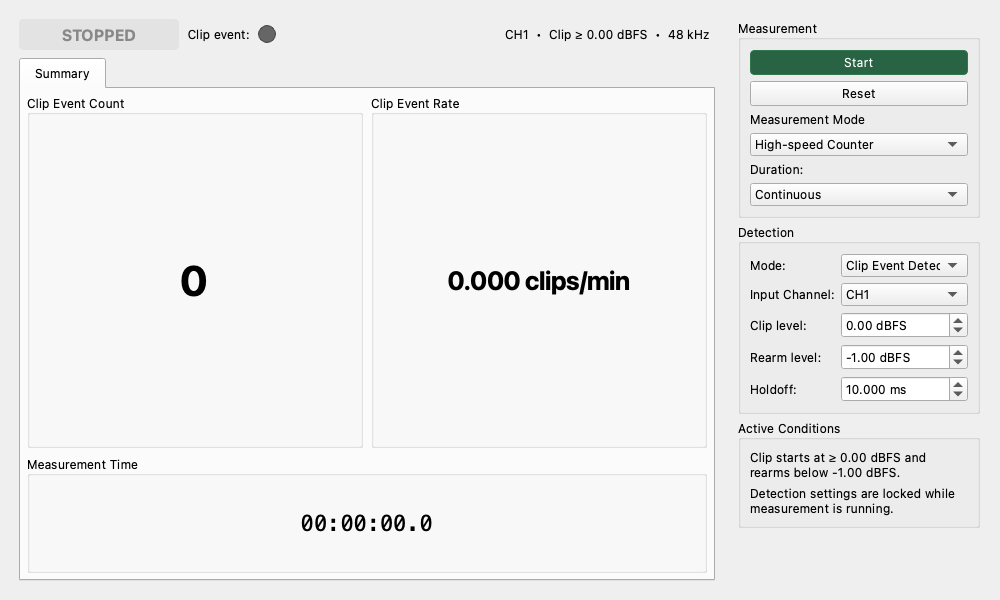
Event Detector continuously monitors every input sample and records the count, amplitude, duration, interval, and rate of threshold events. It is intended for rare phenomena such as popcorn noise, random telegraph noise (RTN) in JFETs or operational amplifiers, and intermittent contact clicks.
Relationship to Other Time-Domain Widgets
| Widget | Primary purpose |
|---|---|
| Oscilloscope | Inspect the shape of a short waveform in detail. |
| Raw Time Series | Visually inspect a decimated, long-duration waveform. |
| Transient Analyzer | Capture a triggered waveform and analyze it with tools such as CWT. |
| Event Detector | Monitor every input sample and record and summarize rare threshold events. |
Event Detector intentionally has no waveform plot. Use Raw Time Series or Oscilloscope alongside it when waveform shape must be inspected.
Detection Settings
Input Channel
Select CH1 or CH2 as the detector input. If the selected channel is not present in the input data, the detector invalidates the current run instead of silently switching channels.
Threshold
Sets the event-start threshold in FS, mV, or V. The mV and V options are available only with valid input calibration and represent peak voltage for the instantaneous input samples. The detector converts the selected value to a full-scale (FS) peak value internally, and it is possible to set a threshold up to 100 dBFS (or equivalent value), allowing for detection above full scale depending on the input scale.
Polarity
Positive: Detect only positive threshold crossings.Negative: Detect only negative threshold crossings.Both polarities: Detect both directions. A direct positive-to-negative reversal without returning to the release band remains one bipolar event.
Hysteresis
Sets the return margin that prevents small fluctuations near the threshold from becoming multiple events. It uses the same unit selected for Threshold.
For positive polarity, an event starts when the signal crosses +Threshold and ends when it returns to or below Threshold - Hysteresis. Negative polarity uses the sign-reversed conditions. With both polarities selected, the event ends when the signal magnitude returns to or below the release level.
Hysteresis must be smaller than Threshold.
Holdoff
Sets the time after an event ends during which new events are ignored. This suppresses recounting caused by ringing or contact bounce. After holdoff, the detector still waits for the signal to enter the release band before rearming.
Runs and Event Records
Each Start, or Reset while measuring, creates a new run. A run stores an identifier, UTC start and stop times, sample rate, input channel, device, threshold, hysteresis, release level, polarity, holdoff, calibration state, and measurement-quality flags. Detection settings are locked while a run is active.
Each event stores the following sample-accurate information:
- Start and end samples and times
- Trigger polarity, largest-absolute-peak polarity, and signed peak value
- Positive and negative peaks when each side was observed
- Duration, start-to-start interval, and quiet time since the previous valid event
- Completion status: valid, censored at stop, censored by a data gap, or censored by a configuration change
A signal already beyond the threshold when measurement starts is not counted. Detection begins with a new crossing after the signal first returns to the release band.
Display Tabs
Summary
Eventindicator: Flashes red for 250 ms when an event is detected. If multiple events arrive between display updates, the increment is shown as+Nfor 600 ms.Event Count: Number of event starts observed in the run. A started event that is censored when acquisition stops remains part of this count.Event Rate: Event Count per minute, normalized by actual elapsed time.Measurement Time: Time calculated from the number of received samples.- The tab also shows valid events, positive and negative events classified by largest peak, censored events, and the latest event.
Event Rate is calculated as follows:
The overall Event Rate is displayed as INVALID after a data gap, clipping, acquisition-configuration change, or event-record retention overflow.
Distributions
Statistics and a histogram are calculated from valid completed events only. Select one of these metrics:
Peak Amplitude: Absolute largest peak. It is shown in Vpeak when input sensitivity is calibrated, or FS peak otherwise.Duration: Time from the threshold crossing until return to the release band.Interarrival Time: Start-to-start time from the prior event where continuity is known.Quiet Time: Time from the end of the previous valid event to the current event start.
The summary reports sample count, minimum, median, mean, sample standard deviation, P95, P99, and maximum. Intervals spanning a data gap or configuration change are omitted.
Rate Trend
The trend uses fixed, non-overlapping bins of 1 second, 10 seconds, 1 minute, 10 minutes, or 1 hour. The current bin is normalized by its elapsed exposure and marked as partial. A bin containing a data gap is invalidated and breaks the plotted line rather than showing a misleading rate across missing input.
Events
The table shows the most recent 500 records. CSV and JSON exports include every retained record together with the run conditions.
- JSON includes the
measurelab.event_detectorschema name and version. - CSV writes run conditions as comment rows followed by the event table.
- Peaks are always retained in FS units, with a converted display value also included when calibrated.
Basic Measurement Procedure
- Connect the DUT to the audio interface, using a low-noise preamplifier when required.
- Use Raw Time Series or Oscilloscope to estimate normal noise and abnormal-event levels.
- In Event Detector, set the input channel, Threshold, Polarity, Hysteresis, and Holdoff.
- Press
Startand verify that the state advances from waiting for release to armed. - After the chosen duration, press
Stopand inspect Summary, Distributions, and Rate Trend. - Save CSV or JSON from the Events tab when an auditable record is needed.
- Replace the DUT and repeat with the same gain, threshold, sample rate, and measurement time.
Measurement Quality and Limitations
- An event spanning multiple audio blocks is counted only once.
CLIPPINGmeans the input reached full scale, so the recorded peak amplitude may be inaccurate.I/O BUFFER ERRORmeans input samples may have been lost. An event active at the gap is retained as censored.- A sample-rate or channel-configuration change during acquisition invalidates the run. Restart measurement under the new conditions.
- The detector retains the most recent 10,000 event records. If older records are discarded, it warns that statistics and export are incomplete.
- DC and very-low-frequency measurement capability depends on the input coupling of the audio interface.